7 Video Feedback Tools for Client Review in 2026
A practical comparison of 7 video feedback tools for editors, agencies, creators and teams that need clearer comments, fewer review loops, and easier client approvals.

Getting video feedback should not require a cleanup session before editing can even start.
But client review often turns into emails, screenshots, chat messages, Google Docs, and notes like "change the part near the middle." The right tool gives everyone one place to watch, comment, approve, and move on.
There is real value in reducing context switching. Asana's 2023 Anatomy of Work report surveyed 9,615 knowledge workers and found leaders lose 3.6 hours per week to unnecessary meetings and use 10 apps per day. Video feedback tools will not fix every workflow problem, but they can remove one common source of delay: scattered review notes.
Quick answer
If you need a simple way to send a large video, collect client comments, and deliver the final files, MoreTransfer is the best fit.
If you run a full post-production workflow, Frame.io is stronger. If your review process includes marketing, legal, packaging, PDFs, websites, or many approval stages, look at Filestage or Ziflow.
Quick picks
- Best for simple client review and delivery: MoreTransfer
- Best for post-production teams: Frame.io
- Best if you already host videos on Vimeo: Vimeo Review
- Best if your team lives in Dropbox: Dropbox Replay
- Best for marketing approval workflows: Filestage
- Best for enterprise proofing: Ziflow
- Best for animation and storyboard review: Krock.io
Comparison table
| Tool | Best for | Interesting edge case | Watch out for |
|---|---|---|---|
| MoreTransfer | Sending large files and collecting client feedback in one link | Review the video alongside stills, captions, audio, PDFs, ZIPs, and final deliverables. Reviewers do not need an account to download. | Not built for complex enterprise approval chains. |
| Frame.io | Professional video production teams | Frame-accurate and range-based comments, version stacks, and production integrations. | Can feel heavy if you only need simple client delivery. |
| Vimeo Review | Teams already using Vimeo for hosting | Replace a video version without changing the review link, then keep comments and approvals in the Vimeo workflow. | Best value when Vimeo is already part of your stack. |
| Dropbox Replay | Dropbox users reviewing mixed media | Supports video, image, audio, PSD, and PDF projects, with uploads up to 150 GB and 12-hour audio/video length limits. | Full value depends on Dropbox storage and plan setup. |
| Filestage | Marketing, agency, and brand approvals | Internal and external review groups, unlimited reviewers, and comments without reviewer accounts. | More process than many freelancers need. |
| Ziflow | Enterprise creative proofing | Review 1,200+ file types with version comparison, public proof links, and workflow stages. | Can be overkill for simple video feedback. |
| Krock.io | Animation, storyboard, and production teams | Combines media review with storyboard, animatic, image, audio, and PDF review. | More of a production workspace than a simple transfer tool. |
Feature notes were checked against public product and pricing pages in July 2026. Pricing and plan limits can change.
Want the simplest option?
If you just need to send a large video, collect comments, and let the client download the final files without a portal account, MoreTransfer gives you one clean transfer link.
It is especially useful when video review is part of delivery, not a full production pipeline.
No credit card required. Recipients do not need an account to download.1. MoreTransfer - Best for simple video delivery and feedback
 MoreTransfer
MoreTransfer is a good fit when the job is simple: send the file, get clear comments, keep versions organized, and deliver the final.
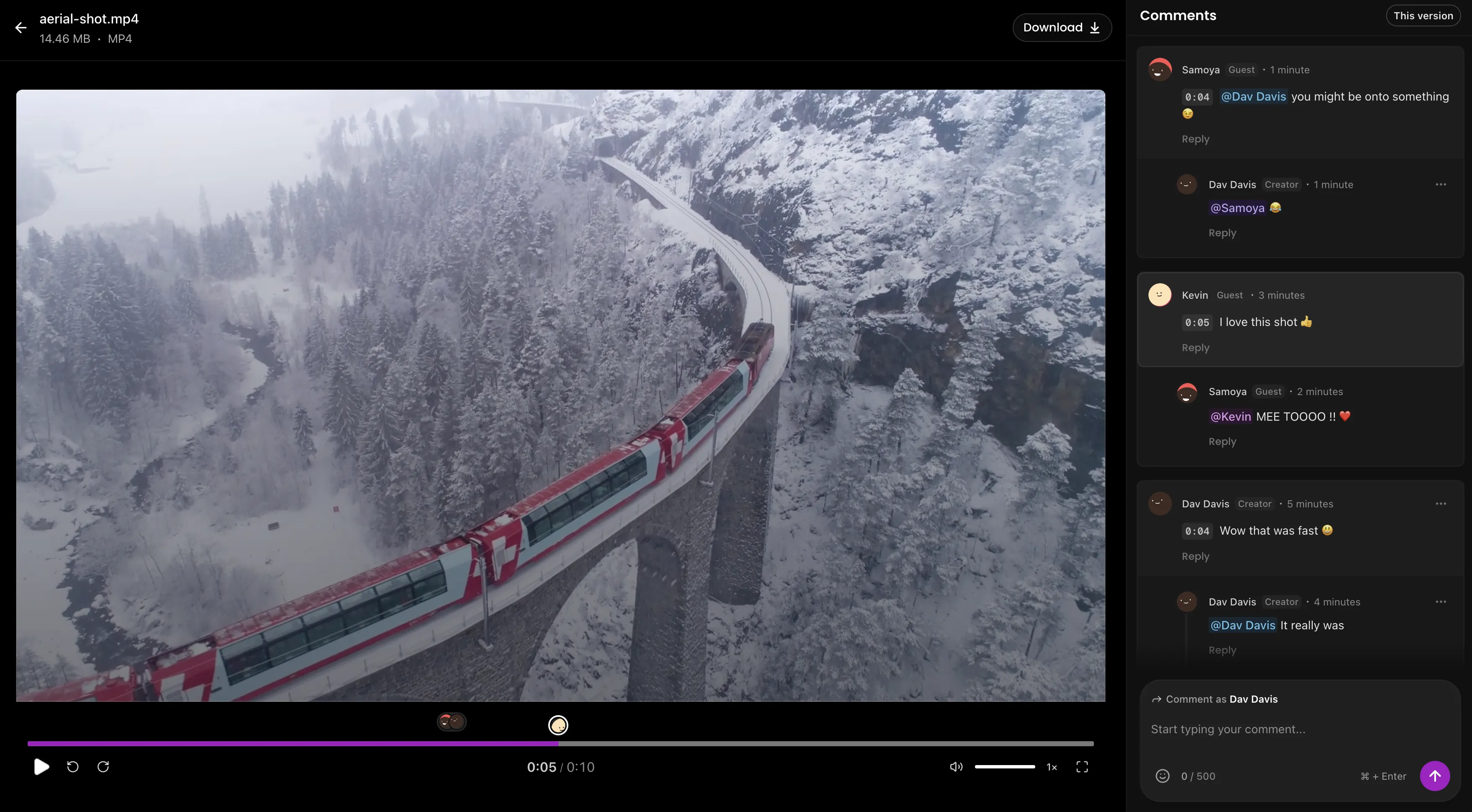
The useful difference is that MoreTransfer starts from file delivery, not from a full production workspace. You can send the review video plus the supporting files clients usually need: thumbnails, captions, audio mixes, PDFs, reference images, project ZIPs, and final exports.
That matters because real client work rarely arrives as one perfect MP4. A campaign review may include a hero video, three cutdowns, captions, stills, a voiceover file, and a final delivery folder.
Where it stands out
- Large file transfer and review in one flow
- Timecoded video comments
- File versioning
- Reviewers do not need an account to download
- Password-protected transfers on paid plans
- Region-specific transfers
- Good fit for clients who just need one link
Where it may not fit
- Complex approval chains with many departments
- Teams that need deep post-production integrations
2. Frame.io - Best for professional production teams
Frame.io is built for serious video teams that need precise comments, review rounds, version control, and production integrations.
It is strongest when review is not just "client watched the cut." It is the operating system for a production workflow: editors, producers, internal reviewers, external clients, and sometimes camera-to-cloud workflows.
Interesting edge case
Frame.io is useful when internal and external feedback must stay separate. A producer may need private internal comments before sending a polished review link to the client.
Where it stands out
- Frame-accurate and range-based comments
- Version stacks
- Annotations
- Premiere Pro, Final Cut Pro, and production integrations
- Strong fit for agencies and post-production teams
Where it may not fit
- One-off client delivery
- Freelancers who do not need a full production workspace
3. Vimeo Review - Best for teams already using Vimeo
Vimeo Review makes the most sense if your team already hosts, manages, or presents video through Vimeo.
The main benefit is continuity. You can use the same platform for hosting, private review links, time-stamped feedback, version history, and final presentation.
Interesting edge case
Vimeo is handy when the review link also needs to become part of the publishing or hosting workflow. For example, a marketing team can review a draft, approve it, then keep the finished video in the same video library.
Where it stands out
- Time-stamped comments
- Review links
- Passwords, expiration, and permissions
- Version history
- Guest feedback support
- Good fit for hosted video workflows
Where it may not fit
- Teams that only need to send raw files
- Workflows where video is one file type among many deliverables
4. Dropbox Replay - Best for Dropbox users
Dropbox Replay is a review and approval tool for teams already storing creative files in Dropbox.
It supports video, image, audio, PSD, and PDF projects, so it is useful when review work is broader than video alone. Dropbox says Replay supports files up to 150 GB and audio/video up to 12 hours.
Interesting edge case
Replay works well when the problem is not sending the file, but managing comments around files already sitting in Dropbox.
Where it stands out
- Video, image, audio, PSD, and PDF review
- Real-time comments and markup
- Version comparison
- Password-protected review links
- Integrations with editing tools
Where it may not fit
- Teams not using Dropbox
- Simple one-off delivery to a client who does not care where the file is stored
5. Filestage - Best for structured marketing approvals
Filestage is built for teams with formal review paths: creative, marketing, legal, compliance, client stakeholders, and final approval.
It is useful when the work is not just a video. Filestage supports videos, images, designs, documents, websites, interactive HTML, and audio files.
Interesting edge case
Filestage is a strong fit for campaign approval. One project might include a launch video, landing page, banner ads, social cutdowns, PDF copy, and legal review.
Where it stands out
- Internal and external review groups
- Unlimited reviewers
- Reviewers can give feedback without creating an account
- Version comparison
- Due dates and reminders
- Good fit for agencies and marketing teams
Where it may not fit
- Solo creators who need a fast review link
- Small teams that do not need formal approval stages
6. Ziflow - Best for enterprise creative proofing
Ziflow is an online proofing platform for larger teams that review many types of assets.
It is strongest when approvals need structure, history, comparison, and control. Ziflow lists support for 1,200+ file types, unlimited reviewers, collaborative commenting, version comparison, and workflow stages.
Interesting edge case
Ziflow makes sense when one approval process covers many formats: video, PDFs, Adobe files, images, documents, and campaign assets.
Where it stands out
- Broad file type support
- Pixel-level version comparison
- Public proof links
- Workflow stages
- Unlimited reviewers
- Enterprise controls on higher plans
Where it may not fit
- Lightweight client video review
- Freelancers who do not want proofing software complexity
7. Krock.io - Best for animation and storyboard review
Krock.io is a creative production workspace with video review, image review, audio review, PDF review, storyboard tools, and animatic features.
It is a good fit for animation studios, explainer video teams, and production teams where feedback starts before the final video exists.
Interesting edge case
Krock.io is useful when clients review the storyboard, animatic, style frames, and final video in the same project flow.
Where it stands out
- Video, image, audio, and PDF review
- Storyboard and animatic tools
- Unlimited reviewers
- 4K playback on paid plans
- Custom branding
- Version comparison
Where it may not fit
- Straightforward large file delivery
- Teams that only need a client review link
How to choose
Pick the tool based on the review problem you actually have.
- Clients keep asking where to comment: use MoreTransfer, Vimeo Review, or Dropbox Replay.
- You send huge files and final deliverables: use MoreTransfer.
- You need post-production depth: use Frame.io.
- You already store everything in Dropbox: use Dropbox Replay.
- You already host everything on Vimeo: use Vimeo Review.
- You need legal, marketing, and client approvals: use Filestage or Ziflow.
- You review storyboards and animatics: use Krock.io.
If you are mainly sending large media from phones or between devices, these guides may be more useful:
- How to transfer large videos from iPhone to Windows PC
- How to send long videos from iPhone to Android without compression
- Best free file transfer sites in 2026
What to look for in a video feedback tool
- Timecoded comments: Can reviewers comment on the exact moment?
- Version history: Can everyone tell which version is current?
- Guest access: Can clients review without creating an account?
- Download controls: Can you allow review but block or protect downloads?
- File type support: Does it handle only videos, or the full set of assets you deliver?
- Delivery workflow: Can you send final files without switching tools?
- Security: Can you use passwords, expiry, permissions, or region controls?
- Pricing fit: Are you paying for features your clients will never use?
Sources checked
- Asana Anatomy of Work 2023
- MoreTransfer pricing and feature limits
- Frame.io pricing and feature comparison
- Vimeo Review feature page
- Dropbox Replay feature page
- Filestage pricing and feature page
- Ziflow pricing and feature page
- Krock.io pricing and feature page
FAQ
What is the best video feedback tool?
For simple client review and large file delivery, MoreTransfer is a strong option. For full production workflows, Frame.io is better. For structured marketing approvals, Filestage or Ziflow may make more sense.
What is the best video feedback tool for clients?
The best tool for clients is the one they can use without training. Look for one clean link, clear playback, simple comments, and no forced reviewer account.
What is the best Frame.io alternative?
MoreTransfer is a lighter Frame.io alternative when you mostly need to send large files and collect client feedback. Vimeo Review, Dropbox Replay, Filestage, Ziflow, and Krock.io are better fits for more specific hosting, storage, proofing, or production workflows.
Can clients leave comments without creating an account?
Some tools support guest or public review links, but settings vary by platform and plan. If reviewer friction matters, check this before choosing a tool.
Do I need video feedback software?
Not for one quick note. But if feedback is scattered across email, chat, screenshots, spreadsheets, and calls, a dedicated review link will usually save time.
What is the fastest way to get video approval?
Send one review link, ask for comments in that link only, upload revisions as clear versions, and get a final approval before delivery.
Written by the MoreTransfer team. We build large file transfer and client review tools for people who need to send work, get feedback, and move projects forward without making reviewers learn another complicated system.
The simple choice
Send your first transfer tonight
MoreTransfer makes it effortless to send large files fast with a clean, private transfer link. Built for creators, teams, and anyone who values simplicity and control.
No credit card required
More from the blog

How to Transfer Large Videos from iPhone to Windows PC (2026 Guide)
AirDrop, USB cables and cloud storage all struggle with large iPhone-to-PC transfers. Here's how to send huge files from your iPhone to a Windows PC using MoreTransfer - no cables, apps, or size limits.
7 mins read
How to Send Large Video Files to Clients for Review
Send full quality video with one review link, keep client comments in one place, and make final delivery feel tidy instead of chaotic.
4 mins read

How to Send Long Videos from iPhone to Android Without Compression
Send large or long videos from iPhone to Android without AirDrop, cables, apps, or compression. Use a private download link instead.
5 mins read